EXPERIENCE
Adobe Acrobat "Optimize PDF" parameter manual: Just follow the tune
Acrobat"Optimization ofPDF'is the accepted compressed ceiling, but the pile of parameters that opens the settings panel - image quality, resolution, downsampling, monomer compression - directly persuades most people. I used it for more than a year, flipped the parameters over and over, and sorted out this"Copy Assignment Edition"Setup manual.
Inlet and main switch
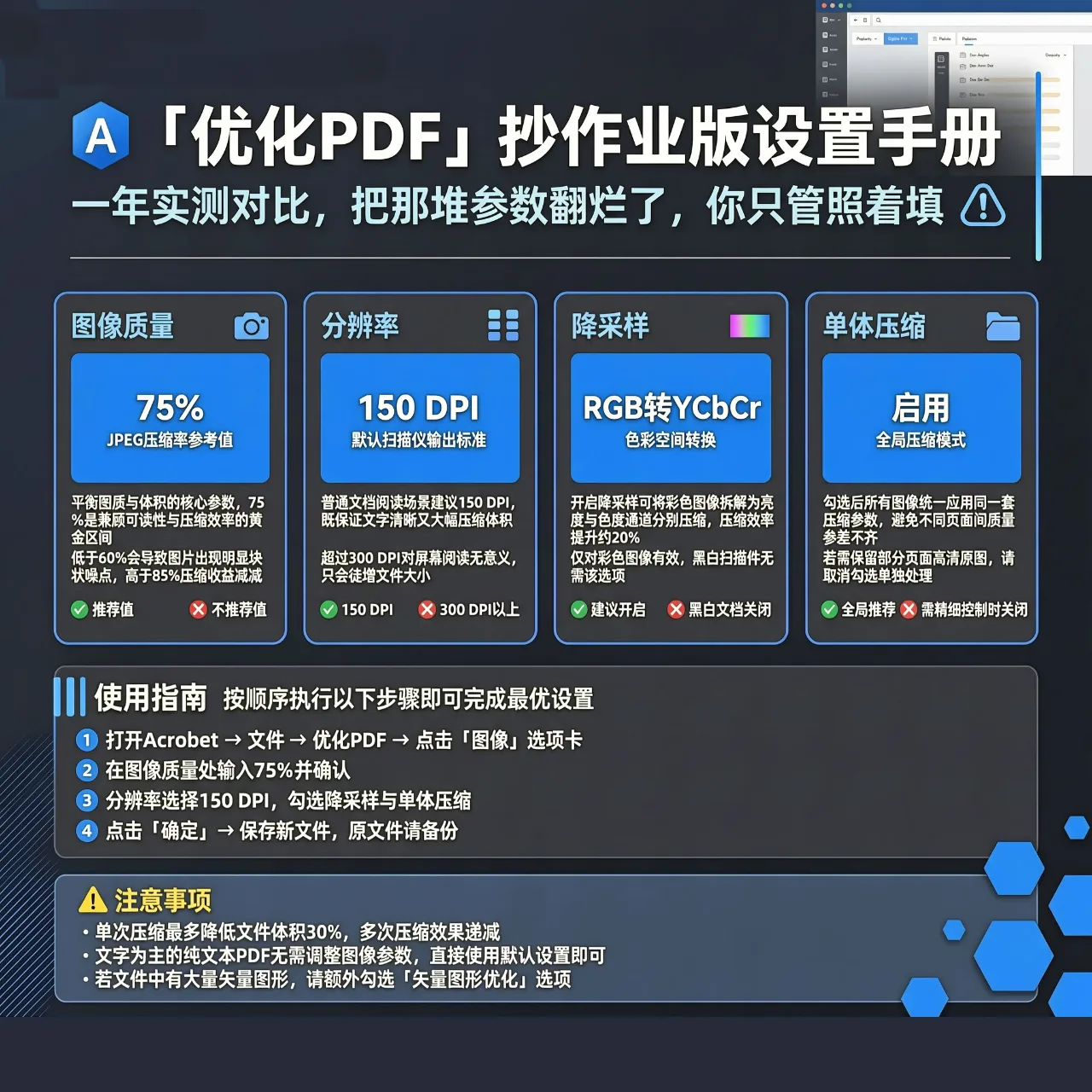
“Tool→ OptimizationPDF, the optimization panel appears on the right. Tap “Advanced Optimization” to go to the detailed settings. The core is just three: the image, the font, and the cleanup. Don't be scared.90%The volume of is determined by the Image panel.
Image Panel: Three Key Parameters
Downsampling (Downsample): Press the high-resolution image to the targetdpi. This is the number one killer by volume. Setup Logic: Color/The grayscale diagram is unified down to "150dpi", threshold value is filled in"225dpi"(The original picture is higher than225will be downsampled to avoid repeatedly compressing the already clear small image). To print, set200dpi。
Image Qualityequivalent toJPEGCompression ratio. Select "selected" or " booklet"file, actual measurement60-70%Quality, the volume is cut in half, and the picture quality is not damaged to the naked eye. Selecting the Minimum File Size preset works wonders, but the chart lines glue.
Single compression format: By default,JPEGSuitable for photo type content; pure black and white line diagram (drawings, calligraphy) selectionCCITTLot4, the compression rate is higher and lossless.
Font panel: A hook between life and death
Check Subset embedded fonts - only embed characters that are actually used in the document. Unchecked is embedded in the whole set of fonts, checking often saves a fewMBto dozensMB. Cancel all font embedding siren operation As mentioned in the previous article, use with caution.
Cleaning panel: white picked volume
Select all cleanup items (bookmarks, forms, comments, etc. to keep on demand). In particular, "discard invalid objects" and "compressed document structure", for old documents, multiple rounds of editingPDFIt's amazingly effective. Pick it up in vain.10%-30%Volume
My three presets
l Circular Edition:150dpi + VBR Quality70% + Subset Font + complete liquidation → The volume is about the original1/5;
l Printer-Friendly Version:200dpi + VBR Quality85% + Subset Font → Volume Approx.1/2;
l Archive:100dpi + Grayscale + VBR Quality60% → Volume Approx.1/10, for retrieval only.
After tuning, use the "Save as Optimized Copy" output, do not overwrite the original.AcrobatExpensive is expensive, but the granularity of these parameters is indeed not available as a free tool.